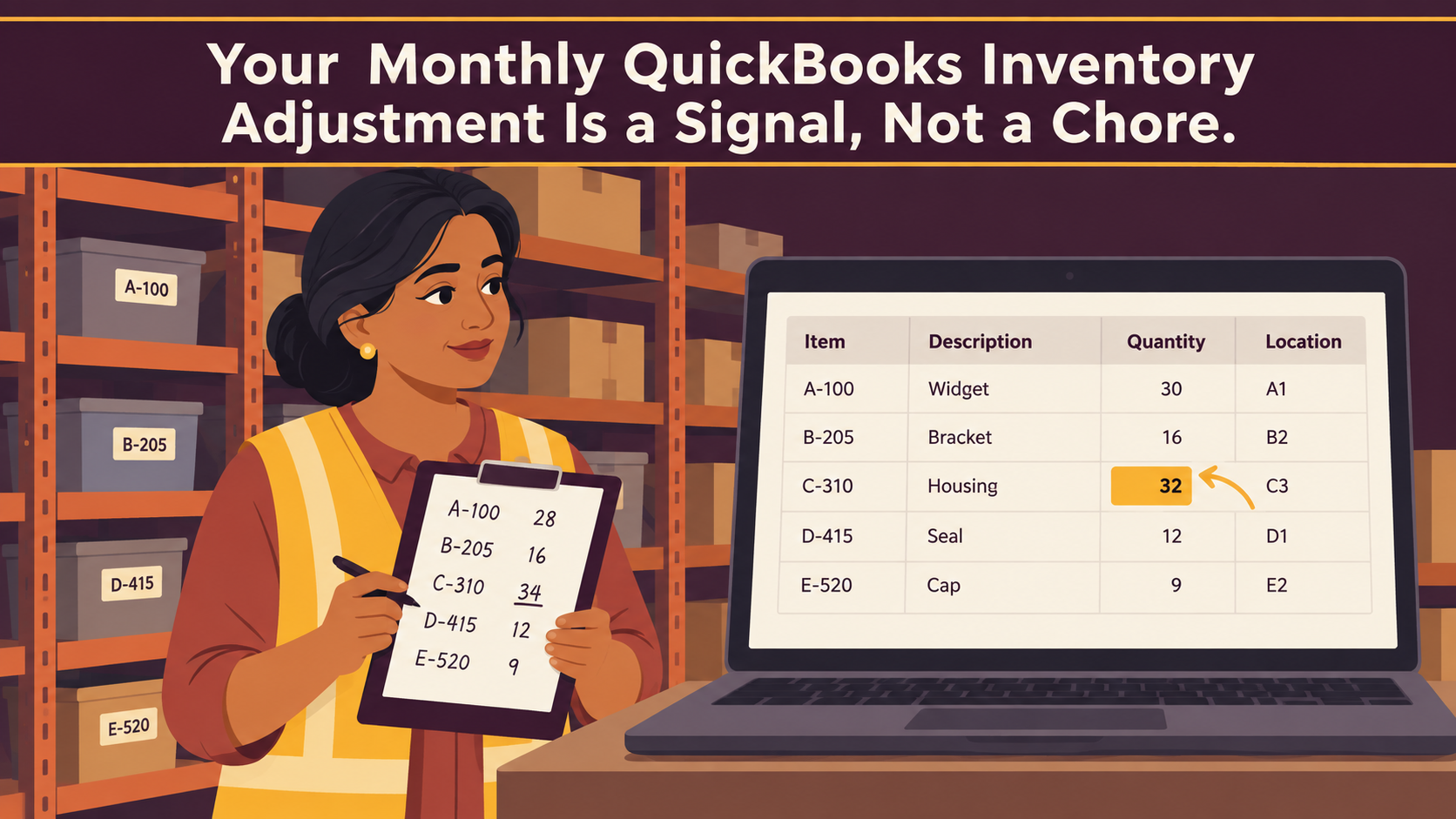
There’s a line item that shows up in the month-end close of most growing product businesses: the inventory true-up. Someone counts the shelves, the numbers don’t match the books, and a correction gets posted to make them agree. Whether it’s a QuickBooks inventory adjustment, a stock correction in another platform, or a plug in a spreadsheet, the mechanics are the same — and so is what a recurring one is telling you.
Most businesses never look at those corrections as a group. Each one gets posted, explained away, and forgotten until the next count. Lined up side by side, a year of them tells a different story: which products keep drifting, in which direction, and how much it’s costing in margin.
A few scattered adjustments are normal. A case gets damaged, a count gets rushed after a busy week, a return goes back on the shelf without paperwork. Every business that holds stock has some. The pattern worth paying attention to is repetition: the same items adjusted month after month, adjustments clustered in the two days before close, a memo field that says some version of “true-up to physical count” eleven times in a row.
When that pattern shows up, the count usually isn’t the problem. The adjustment is where the business reconciles the difference between how product moves now and the simpler flow the books were set up to record: buy it, receive it, sell it. Somewhere along the way the business started building products from components, shipping orders in pieces, storing stock in a second place, or selling through a channel that updates on its own schedule. The physical flow got more complex than the recorded one, and someone has been closing the gap by hand.
That’s a growth milestone, not a software failure. It’s also a cost that compounds quietly — in margin reports nobody trusts, in reorder decisions made on instinct, and in the hours someone spends every month making the numbers agree.
Key Takeaways
- A recurring QuickBooks inventory adjustment on the same items is a process signal, not a counting error. It marks where the physical flow of product has outgrown the recorded one.
- Every quantity adjustment posts through Inventory Shrinkage in Cost of Goods Sold, so repeat adjustments distort monthly gross margin and item-level profitability.
- QuickBooks Online Plus and Advanced cover the core buy-receive-sell flow well, including purchase orders, FIFO costing, and native sales orders that update committed quantities.
- When the business adds assemblies, lot or serial traceability, multiple stock locations, or multi-step fulfillment, SOS Inventory extends QuickBooks Online rather than replacing it.
- Some recurring adjustments trace back to setup and receiving habits. Those get fixed with cleanup, not new software.
Running the QuickBooks Inventory Adjustment Audit
Pulling the list takes a few minutes. In QuickBooks Online, go to Advanced transactions search, set the transaction type to Inventory quantity adjustment, choose the last twelve months, and sort by item. On any other system, pull the report that lists inventory adjustments or write-offs for the year. Then ask four questions.
How often do adjustments happen? One or two a quarter tied to specific events — breakage, a leak in the stockroom, a vendor short-ship caught late — is ordinary operations. Adjustments every month, or every week, mean the books drift out of agreement with the shelves on a regular cycle. Regular drift has a regular cause.
Are the same items showing up? Sort by item and count repeats. If a small group of products accounts for most of the adjustments, the issue lives in how those specific products move — how they’re built, stored, shipped, or sold — rather than in general carelessness.
Which direction do they go? Adjustments that consistently reduce quantity can point to real loss: damage, spoilage, theft, or unrecorded samples. Adjustments that swing both directions — down one month, up the next — almost always point to timing. Product is leaving or arriving in the physical world on a different day, or in a different quantity, than the transaction records it.
How large are they against cost of goods? In QuickBooks Online, run a Profit and Loss and find the Inventory Shrinkage line under Cost of Goods Sold. Every QuickBooks inventory adjustment posts to Inventory Asset and to Inventory Shrinkage (Intuit: Adjust inventory quantity on hand), so that line is the dollar total of every true-up. Other systems post adjustments to their own shrinkage or inventory variance account, and the same test applies. If it’s big enough that someone has to explain it in the monthly review, it’s big enough to trace.
Then read the memo field. “Adjust to count” tells you nothing. “Components used in kit builds” or “short-shipped, balance on backorder” tells you exactly where the process is breaking. If the memos are blank, that’s a finding too: nobody is recording why the numbers keep needing correction, so nobody can fix the cause.
What Repeating Adjustments Usually Trace Back To
In the files we review, recurring QuickBooks inventory adjustments tend to cluster around a handful of operational changes. Each one marks complexity the business took on as it grew.
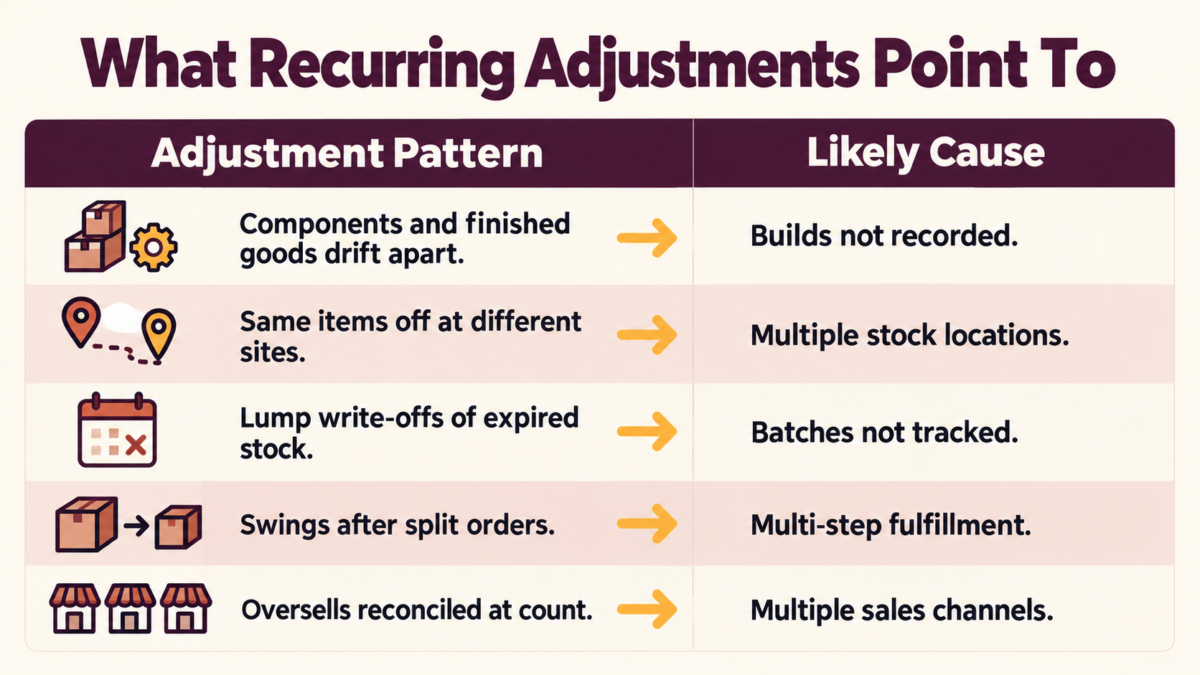
Components and finished goods drifting in opposite directions. When the business builds products from parts — a kit, a gift set, an assembled unit — and the build isn’t recorded as its own step, component counts run high and finished-goods counts run low until someone corrects both. Multi-level builds, where a subassembly becomes part of a larger product, widen the drift.
Items that live in more than one place. Stock in a warehouse, on service trucks, at a showroom, or with a third-party fulfillment provider gets counted place by place. If the books reconcile only to one total per item, every count becomes an exercise in adding up locations and forcing the sum to match, and nobody knows which location was off.
Dated or traceable products. Food, supplements, chemicals, serialized parts, anything with an expiration date. When batches can’t be followed from receipt to sale, expired or recalled product gets written off in lump adjustments after the fact. A customer question about a specific batch becomes a manual search.
Orders that ship in pieces. Native sales orders in QuickBooks Online Plus and Advanced now update committed quantities, which closes part of this gap. The friction returns when fulfillment itself has steps: pick tickets, partial shipments against a single order, backorders carried for weeks. When the warehouse’s version of “shipped” and the books’ version drift apart, the difference lands in an adjustment.
More than one sales channel pulling from the same stock. A storefront, a marketplace, and wholesale orders all draw down the same shelf, each syncing on its own timing. Overselling, cancellations, and returns processed in one channel but not reflected in another all get reconciled at count time.
The following is an example to illustrate how this works in practice — not a specific client case study.
A specialty coffee roaster buys green coffee by the pound and sells roasted coffee in 12-ounce bags through its own website, a marketplace listing, and wholesale accounts. Roasting loses weight, every batch carries a roast date, and wholesale orders ship in pieces as roasts come off the line. Each month the bookkeeper adjusts green coffee down and bagged coffee up or down to match the count, then writes off stale bags in a single entry at quarter end.
None of those adjustments is wrong. Together, they mean the owner can’t say what a bag of any single origin costs to produce, or which channel earns the best margin — right when she’s deciding whether to buy a second roaster.
When Inventory Stops Matching the Count, the Adjustment Isn’t the Fix
An adjustment does one job: it makes the quantity in the books match the quantity on the shelf. It doesn’t record what happened, and that missing record is where the cost builds.
Margin moves on reconciliation timing. Because every QuickBooks inventory adjustment runs through Inventory Shrinkage in Cost of Goods Sold, gross margin drops in the month of a big true-up and the months in between look better than they were. Leadership reviewing month-over-month performance is partly reading the bookkeeper’s calendar.
Item profitability becomes hard to lean on. QuickBooks Online relieves inventory cost on a first-in, first-out basis. When quantities are corrected in bulk after the fact, the cost relieved may not line up with the product that physically moved. Item-level margin reports carry noise that grows with the volume of adjustments.
Purchasing runs on instinct. When on-hand numbers can’t be trusted between counts, buyers pad orders to protect against stockouts. That safety stock is cash sitting on a shelf, one of the patterns covered in The Cash Crisis Warning Signs Already Sitting in Your QuickBooks File.
The ceiling on growth gets lower. Adding a product line, a warehouse, or a sales channel multiplies the adjustments. A monthly true-up that takes an afternoon today takes days after the next expansion. That is often the point where the team starts resisting growth the business could otherwise support.
What Native QuickBooks Inventory Handles Well
For a large share of product businesses, QuickBooks Online is the right place to run inventory, full stop. Inventory tracking is included in QuickBooks Online Plus and Advanced, and Simple Start and Essentials users can add it with Intuit’s inventory add-on (Intuit: Set up and track inventory). Within those plans, the core flow is covered:
- quantity on hand for each item
- FIFO costing that ties Cost of Goods Sold to purchase history
- purchase orders for replenishment
- bundles for grouping items on a sale
- low-stock notifications
- native sales orders that update committed quantity when saved (Intuit: Create and manage sales orders)
Intuit keeps expanding QuickBooks inventory capability, and sales orders are a recent example. Before adding any tool, confirm current native scope against Intuit’s documentation for your plan.
The useful question isn’t whether QuickBooks Online can track inventory. It’s whether the business’s physical flow still matches the direct buy-receive-sell pattern the native tools are designed around. When the audit points to builds, batch traceability, stock in multiple places, or multi-step fulfillment, treat that as a planning consideration. It’s the point where an inventory layer built for those workflows earns its place.
Additional Resource
The QuickBooks Online Features Most Small Business Owners Don’t Know They Have
Where SOS Inventory Fits Alongside QuickBooks Online
SOS Inventory is a cloud inventory, order, and manufacturing application that connects directly to QuickBooks Online. QuickBooks stays the accounting system of record, and SOS handles the operational detail that feeds it. Its capabilities map closely to the adjustment patterns above (SOS Inventory features).
- Builds recorded as builds. Bills of materials with unlimited levels, work orders, work-in-progress, process manufacturing, and decimal quantities for recipes and formulas replace the component-versus-finished-goods true-up.
- Batches that can be followed. Lot and serial tracking with receipt and expiration dates, plus forward and backward traceability, replaces lump write-offs and manual batch searches.
- Stock by place. Multiple locations, bins, and aisles, with transfers between them, replace the add-it-up-and-force-it count.
- Fulfillment with steps. Pick tickets, partial shipments and partial invoices from a single sales order, backorder tracking, barcode scanning, and shipping integrations including ShipStation and UPS keep “shipped” meaning the same thing in the warehouse and the books.
- Channels and true cost. Integrations with Shopify, Amazon, and other platforms keep channels drawing from one count, and landed cost tracking puts freight and duties into item cost.
SOS offers tiered plans. The entry tier covers sales orders and assemblies, while serial and lot tracking, unlimited locations, and barcoding start at the middle tier. Match the plan to the adjustment patterns the audit turned up, not to the longest feature list.
There is a tradeoff. Adding SOS means running two connected systems. Someone has to own the item list, decide which system creates which transactions, and set sync rules before go-live. When that design work is skipped, the adjustments don’t disappear. They move into the integration. That configuration is where most of the value of an implementation is won or lost.
When the Fix Is Cleanup, Not Another System
Not every recurring adjustment signals new complexity. Some trace back to how the file was set up or how the team records transactions:
- starting quantities or costs entered incorrectly when inventory tracking was turned on
- products received on the bill date instead of the day they arrived
- duplicate items for the same product
- stock items set up as non-inventory
- a sales channel posting summary entries without item detail
If the audit points here, adding SOS Inventory would carry the same errors into a second system. The better first move is a cleanup and a short reset of receiving and sales habits, which is often enough to make a QuickBooks inventory adjustment the exception again. If the business later adds builds or locations, a clean file becomes a much stronger foundation for an inventory layer.
Either way, the conversation with Peak Advisers starts in the same place: the adjustment trail.
Additional Resources
QuickBooks Cleanup: The Complete Guide for Business Owners
When You Need QuickBooks Setup Done Right
How Peak Advisers Reads the Adjustment Trail
We start with the same report described above. We pull twelve months of adjustments, group them by item and memo, and trace each repeating item back to the physical process behind it: the build, the location, the shipment, the channel. The recommendation then usually sorts into one of three paths:
- fix setup and habits inside QuickBooks Online
- turn on native features the business is already paying for
- add SOS Inventory for the workflows native tools aren’t designed around
If inventory lives in spreadsheets, QuickBooks Desktop, or another platform today, the same review applies. For some businesses, the right answer is a move to QuickBooks Online with SOS Inventory connected from the start, planned so the new setup doesn’t inherit the old adjustment pattern.
Additional Resource:
Choosing the Right Accounting Software: QBO vs Desktop vs IES
Frequently Asked Questions
Why is my Inventory Shrinkage account so high in QuickBooks Online?
QuickBooks Online creates the Inventory Shrinkage account automatically the first time you adjust an item’s quantity on hand, and each QuickBooks inventory adjustment you save posts there. A high balance usually reflects the volume and size of adjustments over time. It can also come from starting quantities or costs that were entered incorrectly when inventory tracking began, which then get corrected through repeated adjustments. The account itself can’t be removed. Adjustments can be edited or deleted, but Intuit cautions that doing so can significantly affect your books, so work through corrections with your accountant or advisor.
Which QuickBooks Online plans include inventory tracking?
Inventory tracking is included in QuickBooks Online Plus and Advanced. Businesses on Simple Start or Essentials can buy Intuit’s inventory add-on or upgrade their plan.
Does QuickBooks Online have sales orders?
Yes. Sales orders can be created manually in QuickBooks Online Plus, Advanced, and Intuit Enterprise Suite, and saving one updates the committed quantity for those products. SOS Inventory builds fulfillment steps around the sales order: pick tickets, partial shipments, and backorder tracking.
Does SOS Inventory replace QuickBooks Online?
No. SOS Inventory connects to QuickBooks Online and handles operational inventory, orders, and manufacturing detail. QuickBooks Online remains the accounting system.
What does SOS Inventory cost?
As of September 28, 2026, SOS Inventory’s published pricing lists three monthly plans: Companion at $69.95, Plus at $139.95, and Pro at $194.95. Each includes a set number of users, with additional users at $25 per month, and annual billing is also offered. Pricing changes, so confirm current rates on SOS Inventory’s pricing page.
How many QuickBooks inventory adjustments are too many?
There’s no universal threshold. The pattern matters more than the count. Adjustments tied to specific, explainable events are normal. Adjustments that repeat on the same items every month, or swing in both directions, point to a process the books aren’t recording.
Treat the Adjustment Trail as a Planning Tool
A recurring adjustment isn’t a sign that anyone did something wrong. It’s a record of where the business outgrew the flow its books were built to capture, and it shows up in margins, purchasing decisions, and close time long before anyone names it.
If your QuickBooks inventory adjustments repeat on the same items, swing in both directions, or have become a line someone explains every month, it’s worth finding out whether the answer is cleanup, a native feature, or an inventory layer built for how the business operates now. That’s the review Peak Advisers runs, and it starts with the report you can pull today.