The call went well. The tech fixed the problem, the customer was satisfied, and the truck is already on the way to the next job. From the owner’s perspective, that’s revenue.
Whether it becomes revenue depends on what happens next — and in most HVAC businesses, what happens next is a loose chain of text messages, handwritten notes, and someone in the office trying to reconstruct a billable invoice from incomplete information, sometimes hours after the job closed.
That gap is where HVAC businesses lose money. Not on the jobs themselves. In the space between the work being done and the invoice going out accurately and on time.
Key Takeaways
- The gap between dispatch and invoicing is where most HVAC revenue loss happens — not in bad calls or low pricing
- Common failure points include parts not captured on-site, late invoicing, maintenance agreements tracked manually, and cash collected in the field that never hits QuickBooks
- Adding people to manage the gap is the most expensive way to address a system problem
- ServiceM8 connects dispatch, job documentation, on-site invoicing, and QuickBooks Online so the gap closes automatically — when it’s configured correctly
- The right setup depends on business size, device environment, and call volume — not every configuration works for every operation
Where HVAC Revenue Goes Missing
There are four places this happens with enough consistency that they are worth naming specifically.
Parts billed at memory, not actuality. The tech shows up with a van stocked with parts. They pull what the job needs, fix the problem, and move on. What goes on the invoice — if they’re building it from memory at the end of the day or calling the office to reconstruct it — is an approximation. A $40 capacitor, a pound of refrigerant, a filter that was right there in the truck: each one is small. Across a week of calls with three technicians, the cumulative miss adds up. There’s no reliable way to know how much, because the data that would show you that doesn’t exist in any system.
Invoice lag that turns into disputes. An invoice sent the day of the job has a very high collection rate. An invoice sent three days later, when the customer has already moved on mentally, gets questioned. An invoice sent a week later — because it sat in a batch that the office processes every Friday — gets disputed or ghosted. HVAC customers remember the call, but they don’t always remember the scope once time passes. The billing lag that starts as a workflow inconvenience becomes a collections problem.
Maintenance agreements that run on someone’s memory. Recurring service agreements are supposed to be predictable revenue. In practice, they’re only as reliable as the system tracking them. When that system is a spreadsheet maintained by one person, or a recurring calendar invite that doesn’t connect to anything billable, visits get missed, follow-ups don’t go out, and customers let agreements lapse — not because they wanted to, but because nobody reminded them and nobody caught it.
Cash collected in the field that takes a detour. A customer pays at the door — cash or a check handed directly to the tech. That payment should flow into QuickBooks that day, matched to the specific invoice. In businesses without a connected field-to-office system, it flows into whoever’s pocket or desk it lands in, gets written down somewhere, and eventually makes its way to the bookkeeper — usually with enough ambiguity that reconciliation takes longer than it should, and the audit trail is thin.
The Instinct Is to Hire. The Problem Is the System.
When an HVAC business owner recognizes that revenue isn’t tracking the way it should, the first instinct is usually to hire someone — another office person to handle dispatch, another bookkeeper to keep up with invoicing volume.
That instinct is understandable. It addresses the symptom: there is too much work for the current office staff. What it doesn’t address is why there is too much work. If the underlying system requires manual data transfer at every stage — job complete to invoice, invoice to QuickBooks, payment to reconciliation — then adding a person means adding another person to maintain a broken process.
That person will spend their time doing work that a connected system would handle automatically. They will still make errors that come from transcription. And when they leave — or when call volume spikes past their capacity — the gap opens again.
The question is not how many people it takes to manage the gap. The question is why the gap exists.
What a Connected System Does
ServiceM8 is the platform Peak Advisers implements for HVAC businesses that need to close this gap. It’s a field service management application that connects dispatch, job documentation, on-site invoicing, and QuickBooks Online so the information that used to travel by text message travels through a system instead.
Here’s what that changes operationally, at the points where HVAC revenue most commonly leaks:
On-site job documentation. The tech has the job card on their phone. Parts are logged against the job as they’re used — not reconstructed from memory later. Notes, photos, and signatures are captured on site. When the job closes in ServiceM8, the record is complete, not approximate.
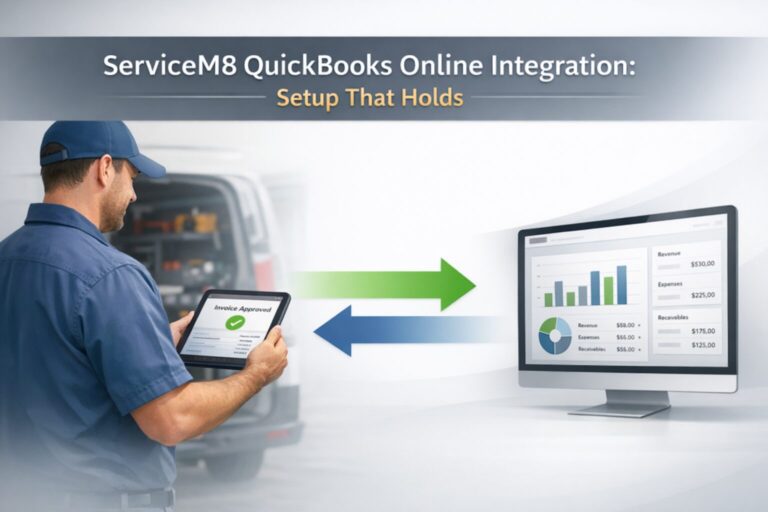
Same-day invoicing. An approved invoice in ServiceM8 pushes to QuickBooks Online automatically. The customer can receive it before the truck leaves the driveway. That is not an aspiration — it is the standard workflow when the system is configured correctly and the tech knows how to use it. Invoice lag measured in days collapses to invoice lag measured in minutes.
Recurring job scheduling for maintenance agreements. ServiceM8 handles recurring jobs natively. A maintenance agreement customer gets a scheduled visit, an automated reminder, and a job card when the date comes — without anyone manually tracking the spreadsheet. When the visit happens, it’s documented and invoiced through the same system as every other job.
On-site payment collection that syncs. ServiceM8 accepts card payment in the field. That payment syncs to QuickBooks Online when the job closes, matched to the invoice, with a clean audit trail. Cash and check handling still requires discipline, but the system eliminates the most error-prone payment path for most transactions.
Office visibility without phone calls. The dispatcher can see where every tech is, what job status each is in, and which calls are next — without calling anyone. When a call runs long, the next customer can be notified before they’re waiting. When a tech is ahead of schedule, the next job can be assigned before they’re sitting idle.
None of this replaces the judgment of an experienced dispatcher or the relationship skills of a good technician. It replaces the manual data transfer that currently sits between field work and financial records.
The scenario below is constructed from patterns we see regularly in HVAC operations
The following is an example to illustrate how this works in practice — not a specific client case study.
An HVAC business owner runs three service trucks — two experienced technicians and one newer hire — primarily handling residential service and repair, with about 60 maintenance agreements on contract. During peak summer season, each truck runs five to seven calls a day.
The current process: techs call or text the office when jobs close, the office manager reconstructs invoices from those notes, batches them in QuickBooks at the end of each day, and chases down missing information when something doesn’t reconcile. Maintenance agreement scheduling runs on a shared Google Calendar that the office manager updates manually.
The problems: invoices for afternoon calls routinely go out the next morning. Parts are occasionally missed — a refrigerant charge here, a capacitor there. Two maintenance agreement customers have let their contracts lapse in the past quarter without anyone noticing until they called for service. One of the newer tech’s calls has a cash payment gap that nobody can fully explain.
After implementing ServiceM8 with a correct QuickBooks Online integration:
- Every job closes with a complete parts list, photos, and customer signature on the tech’s phone
- Invoices push to QuickBooks and go to the customer within minutes of job completion
- Maintenance agreements generate recurring job cards and automated customer reminders without the office manager touching the calendar
- Card payments collect in the field and sync automatically; cash and check payments are logged at job close with a notation that routes to the office for deposit tracking
- The dispatcher sees all three trucks on a live map with real-time job status
The office manager, who was previously spending most of her day reconstructing job information and chasing techs, now uses that time on customer follow-up, upsell outreach, and the business development tasks that had been sitting undone.
The revenue that was leaking didn’t require more trucks or more calls to recover. It required a system that captured it.
The ServiceM8 and QuickBooks Online Integration: What You Need to Know
ServiceM8 integrates directly with QuickBooks Online, and when that integration is set up correctly, the data flow between field operations and financial records works without manual intervention. When it is rushed or configured incorrectly at the start, the problems are systematic — and they compound over time.
A few details that matter for HVAC operations specifically:
Items and parts must be set up in QuickBooks first. Parts and service types that exist in QuickBooks at the time of integration sync to ServiceM8. Parts added directly in ServiceM8 don’t push to QuickBooks until they appear on an exported invoice. For HVAC businesses with a large parts inventory, this means the QuickBooks item list needs to be clean and complete before the integration is connected.
Tax code mapping for parts vs. labor. Many states apply sales tax to parts but not to labor on HVAC calls. ServiceM8 needs to know which tax codes to apply to which line items. This is configured during the integration setup. If it’s skipped or misconfigured, every invoice that goes to QuickBooks will have tax discrepancies — and correcting them retroactively means revisiting every affected job.
Android use in the field is a planning consideration. ServiceM8’s full-featured app is built for iOS — iPhone and iPad. A limited access app is available for Android field techs, but the complete workflow runs on Apple devices. HVAC businesses where some or all techs use Android phones need to account for this before implementation.
The details of this integration — directional data flow, tax code setup, customer record handling — are covered in depth in [ServiceM8 QuickBooks Online Integration: Setup That Holds].
When the Gap Isn’t the Problem
ServiceM8 is built for small to mid-size field service businesses with a high volume of shorter jobs — typically up to around 20 staff. HVAC businesses that fit that profile and are running on disconnected tools are the right candidates.
This is not the right move if the primary problem is QuickBooks setup rather than field-to-office disconnection. If invoices are going out on time and the QuickBooks records are accurate, but the books are a mess, the fix is a QuickBooks cleanup — not a new field service layer on top of a broken accounting foundation.
It is also not the right move for businesses where the majority of techs use Android devices and aren’t willing to consider a change. The platform is iOS-first, and implementation on an Android-heavy team requires a realistic conversation about which features are available to which users before committing.
And for businesses that have outgrown a single QuickBooks file — multiple entities, multiple locations requiring separate financial reporting — the right conversation includes both ServiceM8 and what the accounting layer underneath it needs to look like. That’s a different question than the one this post addresses, and it’s one Peak Advisers handles regularly.
Where Peak Advisers Starts
When a business owner comes to Peak Advisers because revenue isn’t tracking the way it should, the first conversation is about the workflow — not the software. Where does job information get captured? How does it get to the office? How does it become an invoice? How does that invoice get to the customer, and how does payment come back to QuickBooks?
Those answers tell us whether the problem is a dispatch and documentation gap, a QuickBooks setup problem, or both. From there, the right configuration becomes clear.
Peak Advisers is a certified ServiceM8 partner and a certified QuickBooks Solution Provider. When we implement ServiceM8 for an HVAC business, or any business, we configure the QuickBooks integration correctly at the start — item setup, tax code mapping, payment routing — so the data that flows between the two systems is clean from the first invoice.
We also train the team: the dispatcher on the office dashboard, the techs on the field app, and the bookkeeper on what to expect in QuickBooks after the integration is live. Setup without training produces a system nobody uses correctly.
Frequently Asked Questions
Does ServiceM8 work specifically for HVAC businesses?
Yes. ServiceM8 explicitly supports HVAC and refrigeration contractors, along with other trade businesses. The platform handles the workflows common to HVAC service operations — dispatch, job documentation, on-site quoting and invoicing, maintenance agreement scheduling, asset tracking for equipment, and electronic forms for inspection records. It integrates with QuickBooks Online for financial record-keeping.
Does ServiceM8 replace QuickBooks Online?
No. ServiceM8 manages field operations — scheduling, dispatch, job documentation, on-site invoicing, and payments. QuickBooks Online handles accounting — the general ledger, payroll, tax records, and financial reporting. The two systems work together: ServiceM8 pushes approved invoices and payments to QuickBooks automatically when the integration is configured correctly. Neither system replaces the other.
What happens to cash payments collected in the field?
Card payments collected through ServiceM8 sync to QuickBooks Online automatically, matched to the specific invoice. Cash and check payments are logged in ServiceM8 at job close with a notation, which routes to the office for deposit tracking and manual entry into QuickBooks. ServiceM8 reduces the number of cash transactions that fall through the gap, but cash handling still requires a defined office process.
Our techs use Android phones. Does ServiceM8 work for us?
ServiceM8’s full-featured field app runs on iOS — iPhone and iPad. A limited-access app is available for Android users. For teams where most techs use Android devices, this is an important planning consideration before implementation. Peak Advisers can walk through exactly which features are available to Android users and help determine whether the tradeoffs work for a specific operation.
How long does it take to implement ServiceM8?
Basic setup can happen quickly — days rather than weeks. The more important question is how long it takes to configure it correctly: item lists, tax codes, QuickBooks integration settings, custom forms for HVAC inspection and maintenance records, and team training. Rushing that configuration is the most common reason businesses end up with integration problems after the fact. Peak Advisers plans implementation with data quality and configuration first, so the system holds under real operating conditions.
Can ServiceM8 handle maintenance agreements?
Yes. ServiceM8 supports recurring job scheduling, which is the core workflow for maintenance agreements. Recurring jobs can be configured with specific intervals, service types, and automated customer communications. When a recurring visit comes due, a job card is generated automatically and assigned to the schedule. This eliminates the manual tracking that most HVAC businesses currently do in spreadsheets or calendar apps.
The Gap Closes When the System Does
The revenue businesses lose between dispatch and the invoice doesn’t show up as a line item anywhere. It shows up as margin that’s lower than it should be, invoices that go out late, maintenance customers who quietly let their agreements lapse, and a bookkeeper who’s always a week behind.
None of that is a people problem. It is a system problem — and it’s one that a correctly configured ServiceM8 and QuickBooks Online implementation addresses directly.
The gap shows up differently in every operation — different call volume, different team size, different mix of residential and commercial work. But the mechanics are usually the same: work gets done, and the system that should capture it doesn’t quite keep up.
Peak Advisers works with HVAC businesses at exactly this point. If you want an honest read on whether a ServiceM8 implementation makes sense for your operation — or whether a QuickBooks cleanup needs to come first — that’s the conversation we’re built for.
Related Resources:
Schedule A Call with Peak Advisers →
Learn about Our ServiceM8 Services →
Read: ServiceM8 QuikckBooks Online Integration: Setup That Holds →