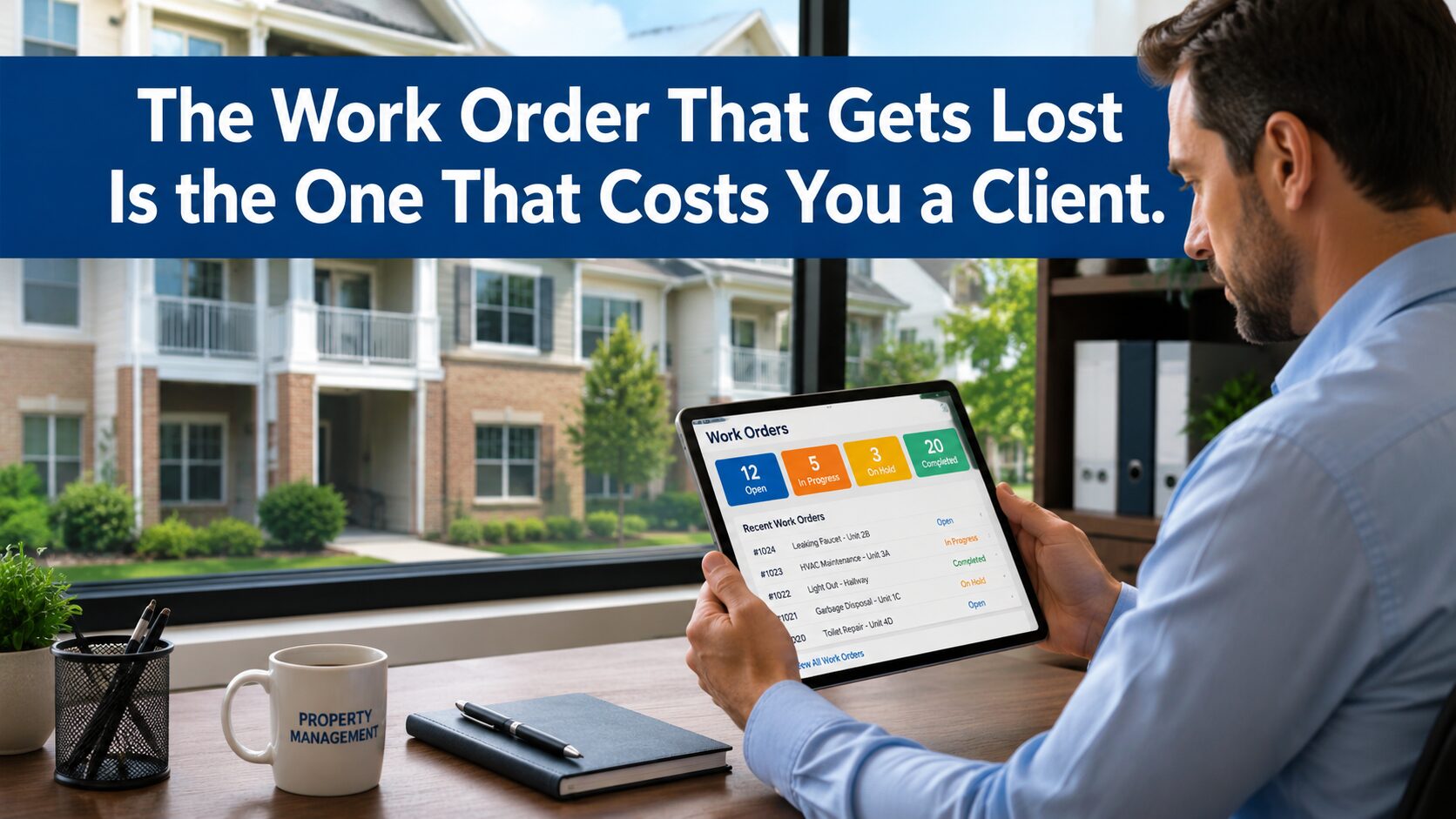
The tenant sent a message Tuesday morning about a leaking faucet. The property manager saw it, made a mental note to call the plumber, got pulled into three other things, and by Thursday the tenant sent a follow-up. The plumber was called Friday. He showed up the following Wednesday, fixed the faucet, and sent an invoice ten days later referencing a property address but no unit number and no work order.
The property manager matched the invoice to the repair by memory, approved it, and logged it in the owner’s monthly statement as “plumbing repair — Unit 4.” The owner asked for documentation. There wasn’t any — not a work order, not a photo of the completed repair, not a vendor confirmation that the job was done.
That sequence happens in property management operations of every size, every week. It doesn’t feel like a crisis in the moment. It feels like Tuesday. But when it happens to the wrong tenant, or the wrong owner, at the wrong time, it is exactly the kind of failure that ends a management relationship. We have a solution to stop this failure before it happens.
Key Takeaways
- Work order failures in property management are documentation failures first — the dispatch and completion happen, but the record doesn’t
- The gap between tenant request, vendor dispatch, completed work, and owner reporting is where property management operations lose credibility with the owners who pay their fees
- Recurring maintenance — seasonal inspections, filter changes, pest control cycles — is the category most likely to run on memory and most likely to get missed as portfolio size grows
- ServiceM8 connects work order creation, vendor dispatch, job documentation, and QuickBooks Online so the record exists at every stage — not just when someone remembers to create it
- The right configuration depends on portfolio size, vendor relationships, and how current maintenance is being tracked — a QuickBooks cleanup may need to come before the field service layer is added
Where Property Management Work Orders Break Down
The failure is rarely in the doing of the work. Vendors show up, repairs get made, properties get maintained. The failure is in the record — the documented chain from tenant request to completed job that tells the owner what happened, when, at what cost, and with what result.
These are the points where that chain most commonly breaks:
The request lives in a text thread. A tenant sends a message. The property manager reads it on their phone, dispatches the vendor by text, and the original request never becomes a formal work order. When the vendor invoice arrives, matching it to the specific request requires memory — or a search through a text thread that may span weeks of unrelated conversation. When an owner asks what the repair was for, the answer comes from recollection rather than documentation.
Vendor dispatch happens outside any system. Most property managers dispatch vendors the same way they’ve always dispatched vendors: a phone call or a text with an address and a description of the problem. The vendor has no formal work order. The property manager has no confirmation the vendor received the request correctly. When the job is done, the vendor sends an invoice on their own timeline, in their own format, with whatever reference information they chose to include — which is rarely enough to match cleanly to the original request without manual effort.
Completed work goes undocumented. The vendor finishes the job. Nobody takes a photo. Nobody records the work performed, the parts used, or the condition of the unit before and after. The owner’s record of what was done to their property is an invoice line item and the property manager’s memory. When a tenant later claims the repair wasn’t completed correctly, or an owner asks about the maintenance history of a unit before a lease renewal, that record doesn’t exist in any form that’s useful.
Recurring maintenance runs on a calendar that one person owns. HVAC filter changes, annual fire extinguisher inspections, pest control cycles, gutter cleanings — every recurring maintenance item in a managed portfolio has a schedule. That schedule usually lives in one person’s calendar, or a spreadsheet that gets updated when someone remembers, or a property management platform that handles leases and rent collection but has no real field service layer. When the person who owns the calendar is out, or the portfolio grows past the point where one calendar is manageable, recurring items start getting missed.
Owner reporting requires assembly. At month end, or when an owner asks, the property manager assembles a maintenance summary from invoices, text threads, emails, and memory. The summary is accurate to the degree that the underlying records are — which is usually not fully. Owners who ask detailed questions about specific repairs, vendor performance, or maintenance costs by unit get answers that are approximate rather than documented. Over time, that approximation erodes confidence.
The Owner Relationship Runs on Documentation
Property management is a trust business. The owner hired a manager because they don’t want to deal with tenant calls, vendor coordination, and maintenance tracking themselves. What they’re paying for — beyond the work getting done — is the assurance that someone is keeping track.
When documentation fails, that assurance fails with it. An owner who asks for a maintenance history and receives a rough summary assembled from memory is an owner who starts wondering what else isn’t being tracked. An owner who receives a vendor invoice they can’t verify — because there’s no work order, no completion photo, and no record of who authorized the repair — is an owner who starts questioning the management fee.
The management relationship doesn’t usually end over a single missed work order. It ends over a pattern — a growing sense that the operation isn’t as organized as it should be. By the time the owner has that conversation, the property manager has often been aware of the documentation problem for months. The fix just never rose to the top of the priority list.
The Portfolio Size Problem
A property manager handling 15 to 20 units can run on memory, spreadsheets, and text threads. The volume is low enough that one person can hold most of it in their head and catch most of the gaps before they become problems.
The system breaks when the portfolio grows. Not catastrophically — gradually. A new property gets added. A second vendor relationship starts. A recurring maintenance schedule gets more complex. The spreadsheet that worked at 20 units becomes a part-time job at 50. At 80 units across multiple properties with multiple owners and a roster of vendors who all communicate differently, the manual system is no longer a workaround. It is a liability.
The property manager who built a reputation managing 20 units well can lose that reputation managing 80 units with the same tools. The work gets done — but the documentation doesn’t keep up, the owner reporting gets thinner, and the first time something goes wrong there is no paper trail to show what was done and when.
The Scenario: 45 Units, Three Properties, One Spreadsheet
The scenario below is constructed from patterns we see regularly in property management operations — it is not a specific client case study.
A property management company handles 45 residential units across three properties for four different owners. Two of the owners are local and occasionally drive by their properties. Two are remote and rely entirely on monthly reporting for visibility into what’s happening.
Current process: tenant maintenance requests come in by text and email, tracked in a shared spreadsheet the office manager updates manually. Vendors are dispatched by phone or text. Completed work is confirmed by the tenant or by the vendor’s invoice. Recurring maintenance is tracked in a Google Calendar shared between the property manager and office manager. Monthly owner reports are assembled from invoices and the spreadsheet at the end of each month.
The problems: two recurring pest control visits were missed in the past quarter because the Google Calendar reminder fired on a day the office manager was out and nobody else saw it. A vendor invoice for $340 arrived referencing a property address with no unit number — it took three days to determine which unit it was for and whether the work had been authorized. One remote owner has started asking more detailed questions about maintenance costs after receiving two consecutive monthly reports with line items he couldn’t verify. The spreadsheet has 23 open items, six of which are older than 30 days with no documented resolution.
After implementing ServiceM8 with a correctly configured QuickBooks Online integration:
- Tenant requests become formal work orders in ServiceM8 at the moment they’re logged — with unit number, property, description, and date
- Vendors receive dispatched job cards through ServiceM8 with the full work order attached — no ambiguity about location, scope, or authorization
- Completed work is documented in the field: photos, notes, and vendor sign-off captured on the job card before the vendor leaves the property
- Recurring maintenance items generate automatic job cards on schedule — the pest control visit that was missed because one person was out doesn’t get missed because the system generates the work order regardless of who’s in the office
- Owner reporting pulls from documented job records rather than assembled from memory — maintenance history by unit, by property, by vendor, by date range, available without manual compilation
- Vendor invoices push to QuickBooks from ServiceM8 with the work order reference attached — matching invoice to job takes seconds rather than days
The owner who was asking detailed questions receives a monthly report with documented work orders, completion photos, and vendor invoices matched to specific units. The conversation shifts from “can you verify this?” to “looks good.”
What ServiceM8 Changes in a Property Management Operation
ServiceM8 is built for businesses managing a high volume of shorter jobs across multiple locations — which describes property maintenance operations precisely. The platform connects the full work order lifecycle: request, dispatch, documentation, invoicing, and accounting integration.
For property management specifically:
Work orders exist from the first contact. When a tenant request comes in, it becomes a job card in ServiceM8 — not a text thread entry or a spreadsheet row. The job card carries the property, the unit, the description, the date logged, and the assigned vendor. Every subsequent action — dispatch, completion, invoicing — connects to that original record.
Vendors work from job cards, not text messages. Dispatched vendors receive a formal job card with the full work order. They know exactly where to go, what the scope is, and what documentation is expected at completion. When the job is done, photos and notes are captured on the job card before they leave. The record exists whether or not anyone follows up to confirm it.
Recurring maintenance runs on the system, not on one person’s calendar. Recurring job cards generate automatically on the schedule configured at setup. A quarterly pest control cycle generates a work order every quarter. An annual inspection generates a job card twelve months after the last one closed. The schedule holds regardless of who’s in the office.
Owner reporting comes from records, not memory. Maintenance history by unit, by property, by vendor, or by date range is available from documented job records — not assembled from invoices and recollection. When an owner asks about the maintenance history of a specific unit, the answer exists in the system and takes minutes to pull, not hours to compile.
Vendor invoices connect to work orders in QuickBooks. When the ServiceM8 and QuickBooks Online integration is configured correctly, vendor invoices push to QuickBooks with the work order reference attached. The invoice that arrives with only a property address can be matched to a specific unit and work order without a three-day investigation.
When This Configuration Doesn’t Fit
ServiceM8 is built for operations running a high volume of shorter, recurring jobs — which fits most residential property maintenance workflows well. Large commercial property management operations with complex procurement processes, multi-trade coordination requirements, or enterprise reporting structures may find the platform’s scope more limited than their needs require. That is a conversation worth having before implementation rather than after.
If the underlying QuickBooks setup is disorganized — vendors coded inconsistently, properties not separated correctly in the chart of accounts, owner distributions mixed with operating expenses — adding a field service layer won’t fix the accounting structure. It will push disorganized data through a cleaner pipeline and produce disorganized QuickBooks records faster. The accounting foundation needs to be solid first. Peak Advisers assesses both before recommending which work comes first.
And for property management companies that have grown to the point where multiple entities, multiple owner structures, or multi-location reporting requirements have outgrown a single QuickBooks file, the right conversation is larger than field service software alone. Peak Advisers handles that regularly.
What the First Conversation Looks Like
When a property manager comes to Peak Advisers because maintenance coordination is consuming more time than it should — or because an owner relationship is showing signs of strain over documentation — the first conversation is about the work order, not the software.
How does a tenant request become a dispatched job? What does the vendor receive, and in what form? How is completed work confirmed? How are recurring maintenance items tracked, and what happens when the person who owns that tracking is unavailable? What does owner reporting look like, and how long does it take to assemble?
Those answers tell us where the gap is and how wide it is. From there, whether the right next step is a ServiceM8 implementation, a QuickBooks cleanup, or both in sequence becomes clear.
Peak Advisers is a certified ServiceM8 partner and a certified QuickBooks Solution Provider. When we implement ServiceM8 for a property management operation, we configure the QuickBooks integration correctly at the start — vendor setup, property and unit coding, recurring job scheduling, owner reporting structure — so the records that flow between the two systems are useful from the first work order.
We train the full team: the property manager on the dispatch workflow, the office on work order management and owner reporting, the bookkeeper on what to expect in QuickBooks when vendor invoices start arriving with work order references attached.
Frequently Asked Questions
Does ServiceM8 work for property management businesses?
Yes. The platform is well suited to property maintenance operations — high volume, shorter jobs, recurring schedules, multiple locations, and vendor coordination across a managed portfolio. Job management, dispatch, work order documentation, recurring job scheduling, and QuickBooks Online integration are all native to the platform. It is not a property management platform in the lease-and-rent-collection sense — it is a field service and work order platform that handles the maintenance side of property management specifically.
Can ServiceM8 handle multiple properties and multiple owners?
Yes, within the job card and client structure. Properties and units can be set up as clients or locations in ServiceM8, and job cards reference the specific property and unit for every work order. Owner reporting by property is available from the job record history. The configuration of how properties, units, and owners are structured in ServiceM8 — and how that maps to the QuickBooks chart of accounts — is part of the implementation work Peak Advisers handles at setup.
How does recurring maintenance scheduling work in ServiceM8?
Recurring jobs are configured with a schedule — weekly, monthly, quarterly, annually, or custom intervals. When a recurring job comes due, ServiceM8 generates a job card automatically and adds it to the dispatch schedule. The job card carries the full work order details configured at setup: property, unit, scope of work, assigned vendor. No manual calendar entry required. When the job closes, the next recurrence schedules automatically.
Our vendors don’t use apps. Will ServiceM8 work with them?
ServiceM8 works best when vendors use the field app to document completed work — photos, notes, and job close on their phone. For vendors who won’t use an app, the property manager or office can document completion on their end when the vendor confirms the job is done. That adds a manual step, but the work order record still exists in the system. Peak Advisers configures the vendor workflow at implementation based on how the specific vendor roster actually operates.
Does ServiceM8 replace property management software?
No. ServiceM8 handles the field service and work order side of property management — maintenance requests, vendor dispatch, job documentation, recurring schedules, and QuickBooks integration. It does not handle leases, rent collection, tenant portals, or owner distributions. For operations already using property management software for those functions, ServiceM8 adds the field service layer that most property management platforms lack. The two systems can run alongside each other.
How does the QuickBooks Online integration handle vendor invoices for property management?
When the integration is configured correctly, vendor invoices approved in ServiceM8 push to QuickBooks with the work order reference attached — property, unit, job description, and date. That reference is what allows the bookkeeper to match the invoice to the correct owner, property, and expense category in QuickBooks without a manual investigation. The configuration of how vendor expenses map to QuickBooks accounts — by property, by owner, by expense type — is part of the implementation setup Peak Advisers handles before the first invoice is exported.
A Dropped Work Order Is a Recoverable Problem. A Lost Client Is Not.
The work order that gets lost on a Tuesday morning is a recoverable problem. The plumber gets called, the faucet gets fixed, the tenant stops following up. Life moves on.
What doesn’t recover as easily is the owner’s confidence when the documentation trail for their asset is thin, inconsistent, or assembled from memory on request. That erosion is quiet and cumulative — and by the time it surfaces as a conversation about the management relationship, it has usually been building for months.
The mechanics are the same across property management operations of every size and every portfolio mix: maintenance work happens, and the system that should document it doesn’t quite keep up. Closing that gap doesn’t require more staff or more follow-up calls. It requires a work order system that creates the record at the moment the request comes in and carries it through to a closed, documented, invoiced job in QuickBooks.
The question is whether the current gap is small enough to manage or wide enough to cost you something you don’t want to lose.
Peak Advisers works with property management operations at exactly this point. If you want an honest assessment of where your work order process is breaking down — and whether a ServiceM8 implementation or a QuickBooks cleanup is the right first step — that is the conversation we are built for.
Links & Resources
Schedule a call with Peak Advisers →
Learn about our ServiceM8 services →
Read: ServiceM8 QuickBooks Online Integration: Setup That Holds →
Read: HVAC Businesses: The Revenue You’re Losing Between Dispatch and the Invoice →
Read: Plumbing Businesses: The Invoice That Goes Out Late Is Already a Cash Flow Problem →